
Navigating through multiple platforms to access grades, check assignments, and schedule appointments with advisors can be incredibly time-consuming and overwhelming for busy students. This fragmented approach not only wastes valuable time but also makes it difficult for students to stay organized and on top of their academic responsibilities. Many students find it challenging to efficiently manage their workload and academic progress when they have to juggle different systems and interfaces. This complexity underscores the need for a unified solution that simplifies these tasks and provides a seamless user experience.
Centralized Academic Dashboard
Develop a centralized dashboard within Pan-Dash that aggregates grades, assignment statuses, and major progress, providing a comprehensive overview in one place.
Unified Login System
Implement a single sign-on (SSO) feature in Pan-Dash, allowing students to access Canvas, MyFIU, Outlook, and Navigate with one login.
Streamlined Navigation
Design an intuitive interface in Pan-Dash that allows quick access to all essential academic information, reducing time spent switching between platforms.
01
Research
Target Potential Users
Quantitive Research
Personas
02
Design
Sketching/Lo-fi Prototypes
User Feedback
03
Evaluate
Usability Test
Takeaways
Target Potential Users
In identifying target users for Pan-Dash, we focused on FIU students who need a clearer way to manage their academic responsibilities. We broke the users into three main groups: students who feel overwhelmed by multiple FIU platforms, students who manually track assignments and deadlines, and students who want a faster way to view important updates in one place. We also looked at student pain points around Canvas, MyFIU, Navigate, Outlook, advising, registration, and degree progress. This helped us understand what students need from a centralized dashboard and guided the usability requirements for Pan-Dash.
Quantitative Research Canvas
To understand the academic pain points behind Pan-Dash, I organized the research into experiments, facts, insights, and opportunities. This helped connect student behavior with clear product decisions.

Concept Map
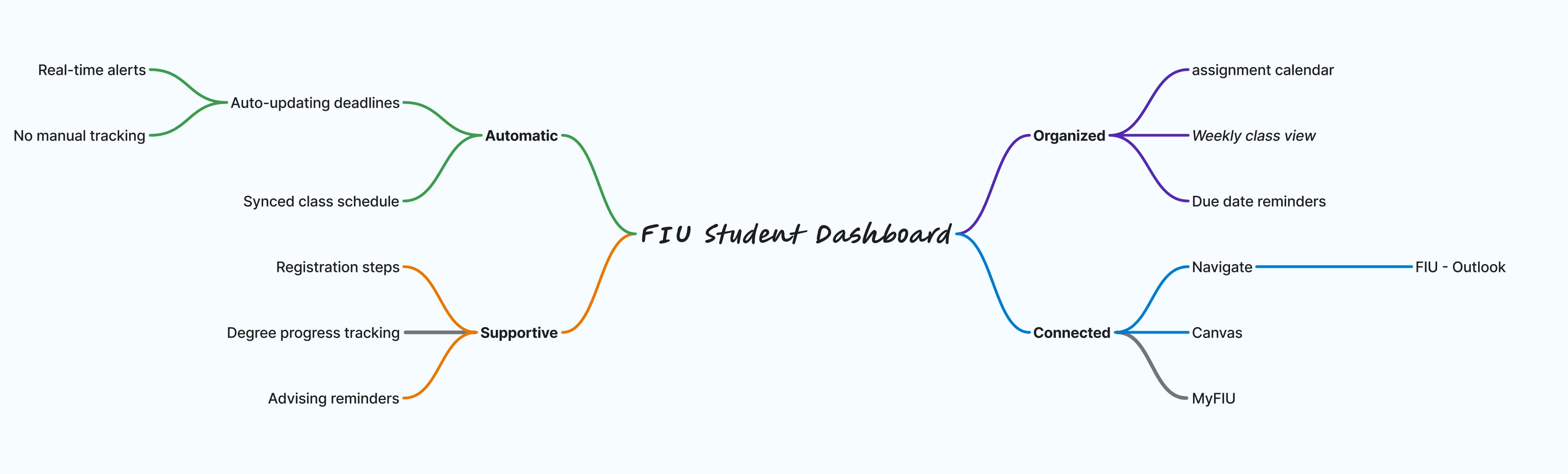
After identifying the main student needs, I created a concept map to define the core direction of Pan-Dash. The map groups the dashboard into four main qualities: organized, connected, automatic, and supportive.
Persona
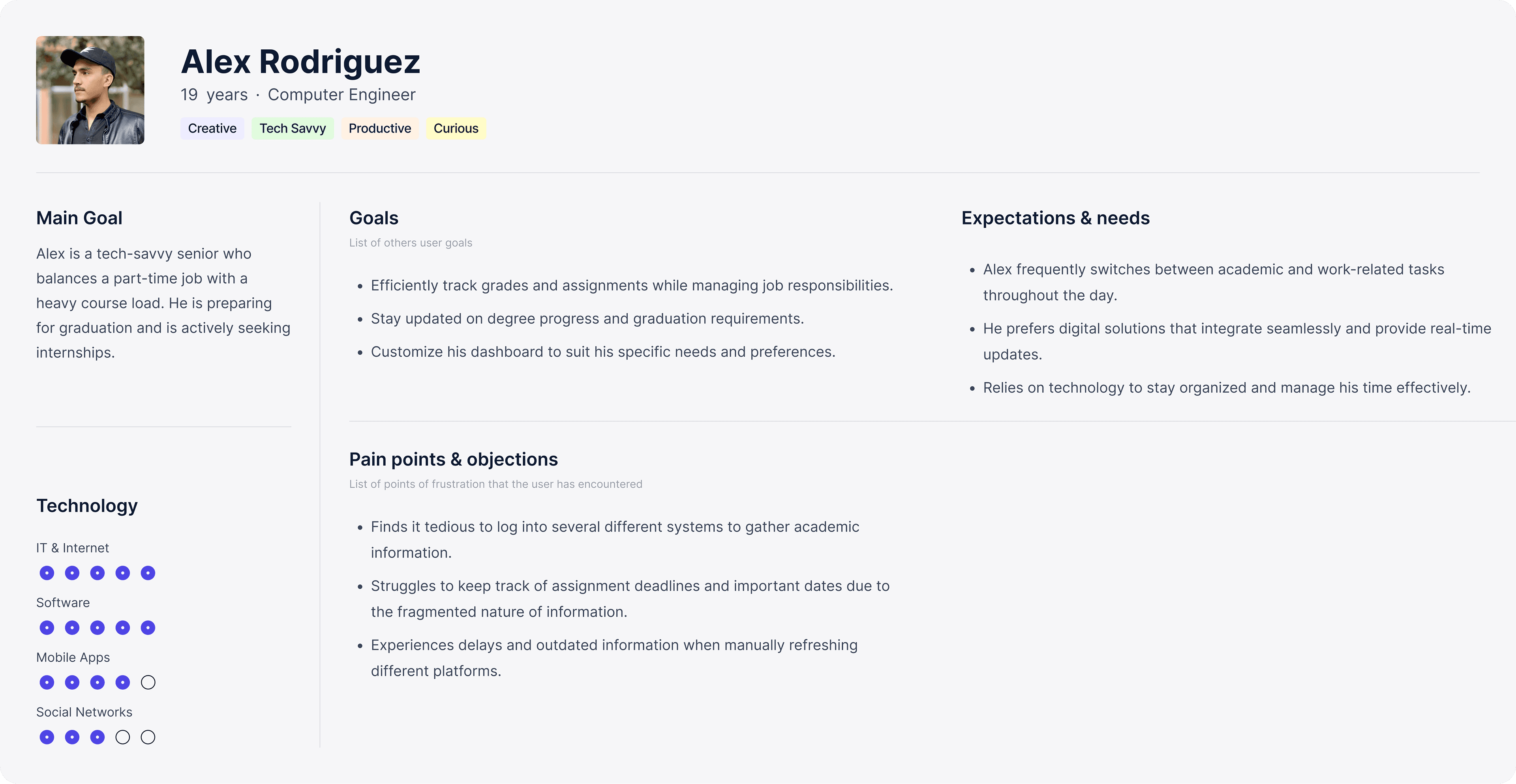
Based on the observations, survey findings, and student pain points gathered during research, I created one primary user persona to represent the main type of FIU student Pan-Dash is designed for. This persona helped organize the user’s needs, goals, frustrations, and academic habits into one clear profile. By focusing on this primary student, my team an I were able to design Pan-Dash around real behaviors such as managing assignments, checking emails, tracking deadlines, preparing for registration, and staying updated on degree progress.
Sketching + Initial Explorations
Before moving into lo-fi wireframes, my team and I started sketching ideas for Pan-Dash based on the requirements from the research phase. We focused on creating a simple and easy-to-learn structure where students could quickly view their dashboard, calendar, tasks, and important academic updates. These sketches helped us explore how Canvas, MyFIU, Navigate, and Outlook could connect into one organized student experience.
Information Architecture
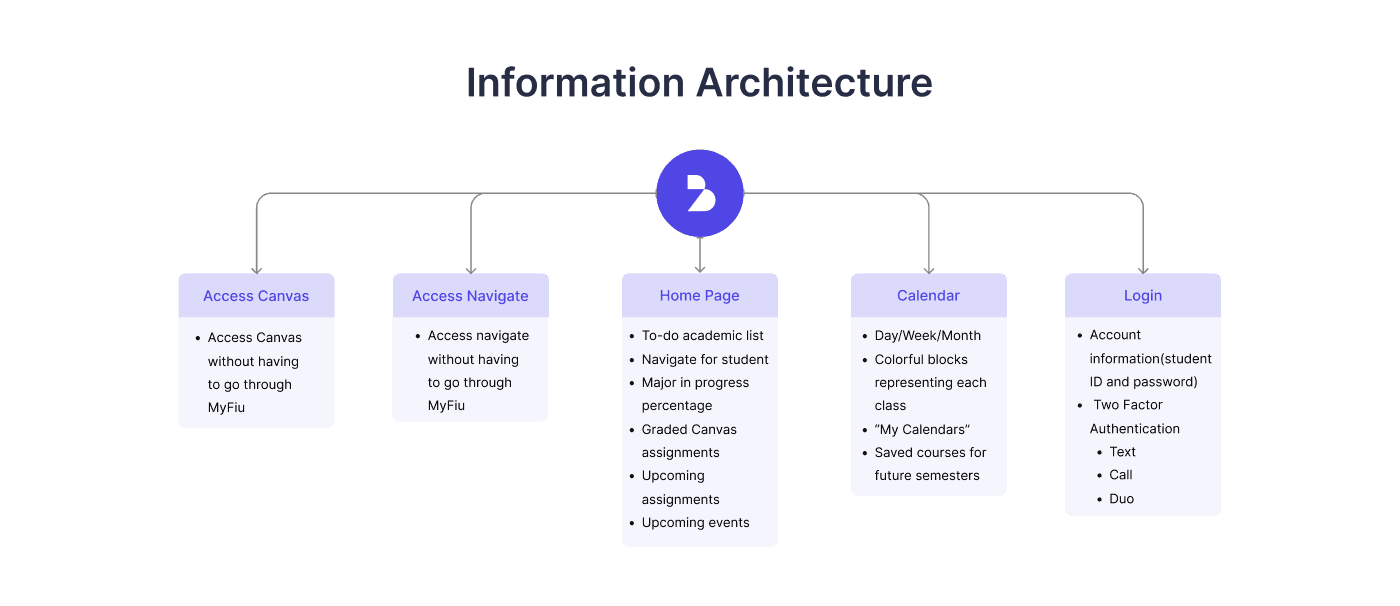
My team and I created an information architecture map to organize the main sections of Pan-Dash, including Canvas, Navigate, the home dashboard, calendar, and login. This helped us plan a clearer student flow with faster access to assignments, deadlines, advising tools, and academic updates.
Iteration & User Testing
After creating the Pan-Dash prototype, we tested the design with users to understand how well the dashboard supported common student tasks. Participants were asked to complete actions such as checking upcoming assignments, viewing the calendar, accessing Canvas or Navigate, and finding important academic updates. After the test, users shared feedback on what felt clear, confusing, or missing. This helped identify areas to improve, including simplifying navigation, making deadlines more visible, and clarifying how students move between dashboard sections.


For the final iteration, we refined Pan-Dash into a more complete student dashboard that brings academic tasks, course updates, calendar events, Canvas information, and Navigate access into one place. The dashboard view was designed to give students a quick overview of what needs attention first, including their to-do list, assignment grades, upcoming assignments, student Navigate updates, degree progress, and campus events.
We also expanded the calendar experience into day, week, and month views so students could choose how they want to plan their schedule. The final calendar design uses color-coded classes and events to make deadlines easier to scan, while the side panel keeps today’s tasks, saved courses, and personal calendars visible. These changes helped make Pan-Dash feel more organized, connected, and useful for students who need to manage multiple academic responsibilities at once.


This project has been both enjoyable and immensely educational, underscoring the critical role of user-centered design in crafting effective and efficient digital solutions for FIU students. By addressing major pain points such as the hassle of logging into multiple platforms, the challenge of tracking academic progress, and the inefficiencies in managing assignments and deadlines we developed Pan-Dash, a unified dashboard that simplifies and enhances the student experience.
Through collaborative efforts, comprehensive user research, and iterative design, we created a platform that not only meets the immediate needs of FIU students but also significantly boosts their overall academic productivity and organization. What began as a class project has demonstrated the transformative power of thoughtful UX/UI design in turning complex processes into intuitive, user-friendly interfaces. This success has even led the board of directors to endorse our design, paving the way for Pan-Dash to become an official website for all FIU students.